Editing data
Change cells, add and delete rows, review every change as a diff and save it all in one transaction.
On this page
- How editing works
- Editing a cell
- Setting NULL
- Editors by type
- Inserting rows
- Open the panel
- Fill in the fields
- Add it to the queue
- The row panel
- Selecting and deleting rows
- Selecting a block of cells
- Copy
- Paste from a spreadsheet
- Pending changes
- The diff
- Saving
- Undo and redo
- Conflicts
- Tables without a primary key
- Read-only mode
How editing works#
Nothing you do in the grid touches the database right away. Edits, new rows and deletions wait in a queue of pending changes. You review them and save them together, in one transaction.
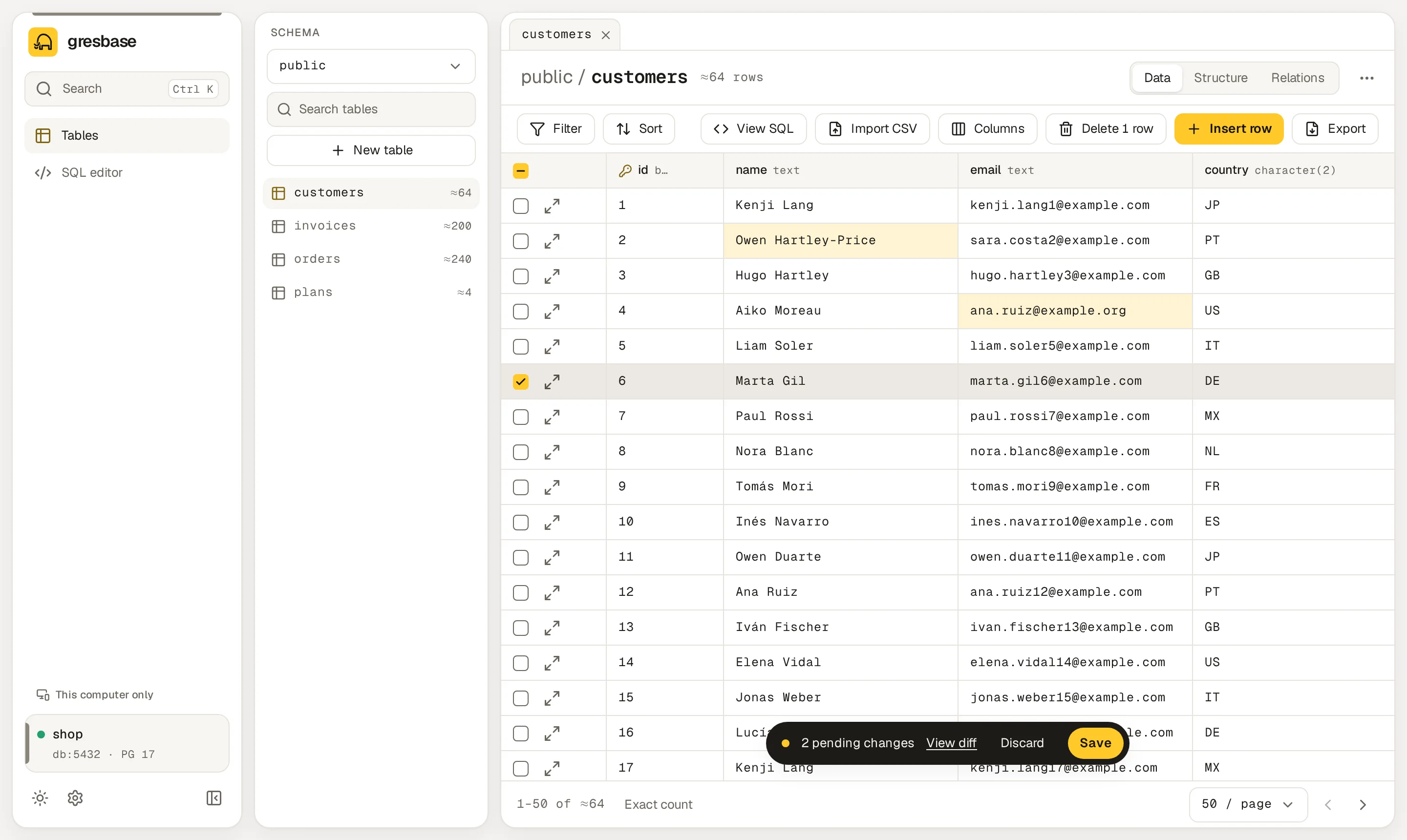
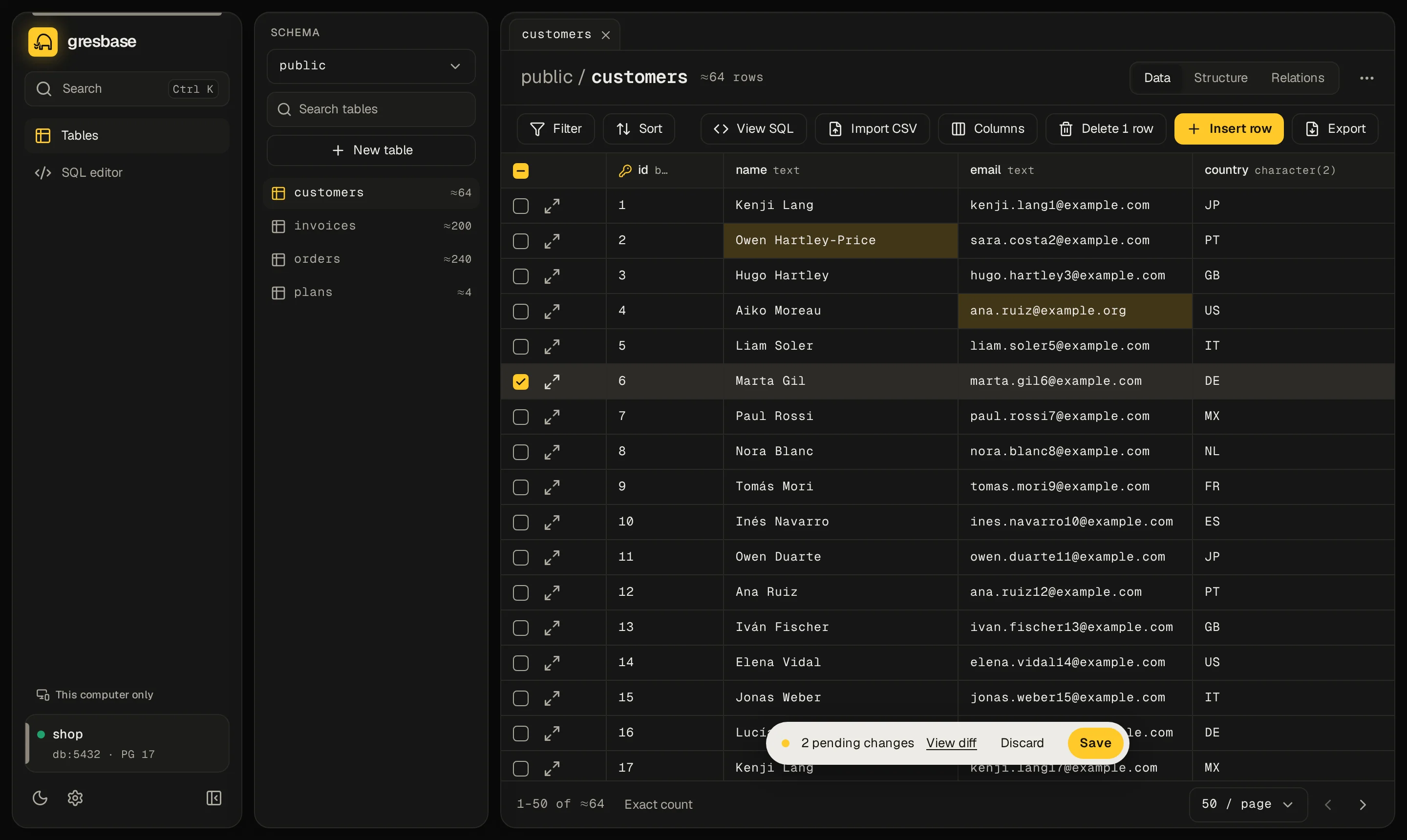
You can edit a table's rows when it is a table or a partitioned table, it has a primary key, and Gresbase is not read-only. Otherwise the header shows Read-only. See tables without a primary key and read-only mode.
Editing a cell#
Select a cell with the mouse or the arrow keys. Open its editor with Enter, F2 or a double click.
| Key in the editor | Effect |
|---|---|
| Enter | Puts the value in the queue |
| Ctrl Enter (⌘ Enter on macOS) | Same, in multi-line editors |
| Tab / Shift Tab | Puts the value in the queue and moves to the next or previous column |
| Esc | Closes the editor without changing anything |
| Ctrl S (⌘ S on macOS) | Puts the value in the queue and saves every pending change |
Clicking outside the editor keeps a valid value and drops an invalid one.
The editor is multi-line for JSON, arrays and text longer than 60 characters or with line breaks. There, Enter adds a line.
Edited cells are tinted. Typing the original value back removes the change from the queue.
Setting NULL#
Press Ctrl Backspace (⌘ ⌫ on macOS) on a cell to set it to NULL. In a NOT NULL column you get a notice, such as "email can't be NULL.", and nothing changes.
Editors by type#
| Column type | Editor |
|---|---|
boolean |
A list with true and false |
| Enums | A list with the values of the enum |
json, jsonb and arrays |
A code editor. Arrays are written as JSON, like ["a", "b"]. |
date |
The browser's date picker |
timestamp, timestamptz |
Text in the form YYYY-MM-DD HH:MM:SS+00 |
| Integers and numbers | Text, checked before it goes to the queue |
| Text and anything else | A text field, multi-line when the text is long |
Some columns can't be edited: generated columns, GENERATED ALWAYS AS IDENTITY columns and bytea.
A value that doesn't fit stays in the editor with a message, such as "Enter a whole number." or "That isn't valid JSON.". The server casts every value to the column's real type anyway.
Inserting rows#
-
Open the panel#
Click Insert row in the toolbar. The Insert row panel opens on the right.
-
Fill in the fields#
Each column shows what an empty field becomes: Set by the database, Default: …, Required or Empty means NULL. Required columns have a red asterisk. Tick NULL to send an explicit
NULL. -
Add it to the queue#
Click Add to queue. The new row shows at the top of the grid with a coloured left edge.
An empty field in a new row means "use the default". You can still edit the new row in the grid. Its Remove new row button (×) drops it.
The row panel#
The Open row button at the start of each row opens the whole row in the Row panel. There you edit every field at once and press Apply. Duplicate opens a new row with the same values, except the primary key. Referenced by lists the rows of other tables that point to this one.
Selecting and deleting rows#
Click anywhere on a row to select it. The checkboxes at the start of each row do the same.
| Action | Effect |
|---|---|
| Click | Selects only that row |
| Ctrl + click (⌘ + click on macOS) | Adds or removes that row |
| Shift + click | Selects every row from the last one you clicked |
| Header checkbox | Selects or clears every row on the page |
Click Delete N rows to mark the selected rows. They stay in the grid, struck through, until you save. Keep this row on a struck row takes it back out of the queue. The button reads Delete rows and stays disabled while nothing is selected.
Selecting a block of cells#
Drag across cells, or Shift + click, to select a rectangle. With the keyboard, hold Shift and use the arrow keys. Esc goes back to a single cell.
Copy#
Ctrl C (⌘ C on macOS) copies the selection as tab-separated values, without a header. That is what spreadsheets paste natively.
Right-click the selection for more formats:
| Entry | Result |
|---|---|
| Copy | Tab-separated values, no header |
| Copy as CSV | Comma-separated, with a header row |
| Copy as JSON | An array of objects, one per row |
| Copy as INSERT | An INSERT INTO "schema"."table" (…) VALUES …; statement |
NULL is an empty field in TSV and CSV, and NULL in the INSERT. Values cut at 10 KB are copied in full when the table has a primary key.
bytea values only travel as a preview of their first 32 bytes, so a longer value is copied incomplete, ending in ….
Paste from a spreadsheet#
Select the top-left cell and press Ctrl V (⌘ V on macOS). The menu entry Paste does the same when the browser lets the page read the clipboard.
- Text with tabs is read as a table, as Excel and Google Sheets copy it.
- Without tabs, several lines with the same number of commas are read as CSV. Anything else goes into one column.
- Cells fill to the right in the order you see the columns. What falls past the last column is dropped.
- Cells in columns that can't be edited are skipped, and a notice says how many.
- An empty cell becomes
NULL, or an empty string in aNOT NULLtext column. - Booleans accept
true,t,yes,y,on,1and their opposites.
If the data goes past the last row, Gresbase asks Insert N new rows?. Choose Insert rows or Only update existing rows.
Values that don't fit their column are marked in red, and the pill counts them. Saving stays disabled until you fix them. A whole paste is one undo step.
Pending changes#
While the queue has changes, a pill floats at the bottom of the grid: N pending changes, View diff, Discard and Save.
Changing page, filters or sort keeps the queue. Leaving the table asks Leave without saving?, with Stay and Discard and leave. The queue lives in the browser tab, so reloading the page loses it after the browser's warning.
The diff#
View diff lists every change: updates with the old value struck through and the new one, inserts with their values, and deletes. Below it you see the exact SQL that will run.
Everything is saved in one transaction: either all of it or nothing. If the change can't be undone after saving, the dialog says why.
Saving#
Click Save, or press Ctrl S (⌘ S on macOS) anywhere on the Data tab. Discard empties the queue.
If you delete rows that other tables reference with ON DELETE CASCADE, SET NULL or SET DEFAULT, a dialog asks first. It shows how many rows of each table will be touched. Delete anyway goes on.
A notice confirms the save with an Undo button for 10 seconds.
Undo and redo#
| Shortcut | Effect |
|---|---|
| Ctrl Z (⌘ Z on macOS) | Undo |
| Ctrl Shift Z (⌘ ⇧ Z on macOS) | Redo |
Undo first steps back through the pending changes, one edit at a time. When the queue is empty, it undoes the last save of this table. The server applies the inverse changes, in a new transaction.
The server keeps the last 50 saves of each session. A reload loses the undo history of saves.
Some saves can't be undone. The table has triggers that may change other data, a delete cascades to other tables, or a key change cascades. The diff warns you before you save, and the notice says "It can't be undone.". The app's history then starts over, so Ctrl Z never jumps over that save.
Conflicts#
Gresbase checks each row before it writes. An update checks that the columns you changed still hold the values you loaded. A delete checks the whole row. An insert checks that no row has that primary key.
If someone else got there first, nothing is saved. The API answers 409 conflict, and you read a message such as:
Nothing was saved. Change 2 (Update id = 7): someone else changed email. Reload to see the current values.
Your queue stays as it was. Discard the change that clashes, or reload and do it again.
Undo and redo check the same way. If the data changed after your save, Can't undo: the data changed shows each column with the value expected and the value Now. Nothing is touched.
Tables without a primary key#
Without a primary key, Gresbase can't point at one row safely. The grid is read-only, rows can't be pinned and pages go by offset. The API refuses writes with no_primary_key.
Add a primary key from the Structure tab, or change the rows from the SQL editor.
Read-only mode#
In read-only mode the editing buttons, the import and the table actions disappear. The badge says Read-only. The API answers 403 read_only to any write, and the database connection is read-only too. See Read-only mode.